


Page 268 - Learn To Program With Scratch
P. 268
using the backpack
                         The backpack (available only to logged-in users) allows you to copy sprites,
                         scripts, costumes, backdrops, and sounds from any project and use them in
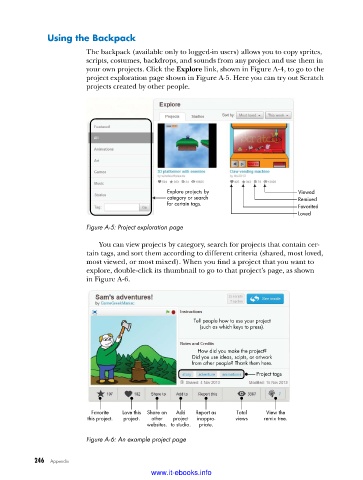
                         your own projects. Click the Explore link, shown in Figure A-4, to go to the
                         project exploration page shown in Figure A-5. Here you can try out Scratch
                         projects created by other people.


                                               Explore projects by                  Viewed
                                               category or search                   Remixed
                                               for certain tags.                    Favorited
                                                                                    Loved

                         Figure A-5: Project exploration page

                             You can view projects by category, search for projects that contain cer-
                         tain tags, and sort them according to different criteria (shared, most loved,
                         most viewed, or most mixed). When you find a project that you want to
                         explore, double-click its thumbnail to go to that project’s page, as shown
                         in Figure A-6.


                                                       Tell people how to use your project
                                                         (such as which keys to press).


                                                        How did you make the project?
                                                      Did you use ideas, scipts, or artwork
                                                      from other people? Thank them here.
                                                                        Project tags


                          Favorite  Love this  Share on  Add  Report as  Total  View the
                         this project.  project.  other  project  inappro-  views  remix tree.
                                          websites. to studio.  priate.

                         Figure A-6: An example project page


           246   Appendix
                                           www.it-ebooks.info

