


Page 270 - Learn To Program With Scratch
P. 270
Menu Bar               Cursor Tools


                                                                                          Tips Window
                                                                        Scripts Area


                                   Stage
                                                               Blocks Palette


                                    Sprite List
                                                                             Backpack


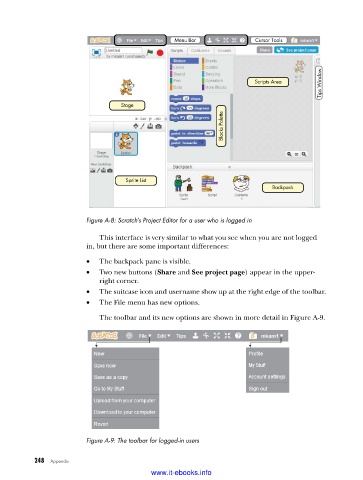
                         Figure A-8: Scratch’s Project Editor for a user who is logged in
                             This interface is very similar to what you see when you are not logged
                         in, but there are some important differences:
                         •   The backpack pane is visible.
                         •   Two new buttons (Share and See project page) appear in the upper-
                             right corner.
                         •   The suitcase icon and username show up at the right edge of the toolbar.
                         •   The File menu has new options.
                             The toolbar and its new options are shown in more detail in Figure A-9.


                         Figure A-9: The toolbar for logged-in users


           248   Appendix
                                           www.it-ebooks.info

