


Page 95 - Learn To Program With Scratch
P. 95
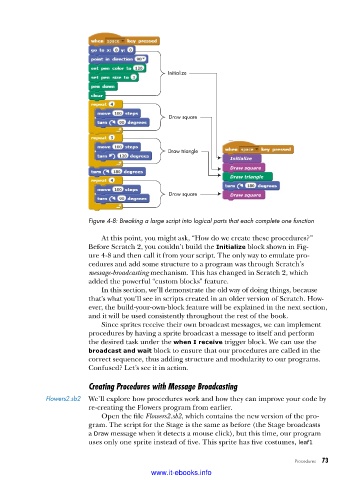
Initialize


                                                Draw square


                                                Draw triangle
                                                                 Initialize
                                                                 Draw square
                                                                 Draw triangle

                                                Draw square      Draw square


                          Figure 4-8: Breaking a large script into logical parts that each complete one function
                             At this point, you might ask, “How do we create these procedures?”
                          Before Scratch 2, you couldn’t build the Initialize block shown in Fig-
                          ure 4-8 and then call it from your script. The only way to emulate pro-
                          cedures and add some structure to a program was through Scratch’s
                          message-broadcasting mechanism. This has changed in Scratch 2, which
                          added the powerful “custom blocks” feature.
                             In this section, we’ll demonstrate the old way of doing things, because
                          that’s what you’ll see in scripts created in an older version of Scratch. How-
                          ever, the build-your-own-block feature will be explained in the next section,
                          and it will be used consistently throughout the rest of the book.
                             Since sprites receive their own broadcast messages, we can implement
                          procedures by having a sprite broadcast a message to itself and perform
                          the desired task under the when I receive trigger block. We can use the
                          broadcast and wait block to ensure that our procedures are called in the
                          correct sequence, thus adding structure and modularity to our programs.
                          Confused? Let’s see it in action.

                          Creating Procedures with Message Broadcasting
              Flowers2 .sb2  We’ll explore how procedures work and how they can improve your code by
                          re-creating the Flowers program from earlier.
                             Open the file Flowers2.sb2, which contains the new version of the pro-
                          gram. The script for the Stage is the same as before (the Stage broadcasts
                          a Draw message when it detects a mouse click), but this time, our program
                          uses only one sprite instead of five. This sprite has five costumes, leaf1

                                                                                   Procedures   73

                                           www.it-ebooks.info

