


Page 96 - Learn To Program With Scratch
P. 96
through leaf5, and will call a procedure to draw a flower for each costume.
                         Since we have a single sprite, we only need one copy of the drawing code
                         (not the five duplicate scripts we had in our first version). This makes the
                         program smaller and the code easier to understand. When the sprite in
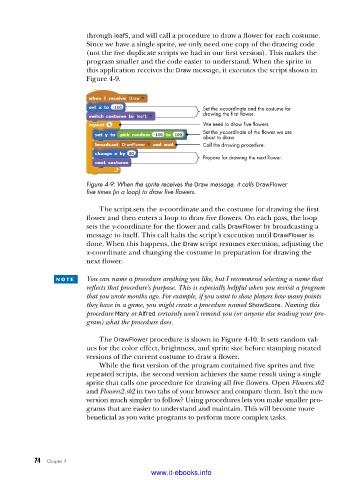
                         this application receives the Draw message, it executes the script shown in
                         Figure 4-9.


                                                         Set the x-coordinate and the costume for
                                                         drawing the first flower.
                                                         We need to draw five flowers.
                                                         Set the y-coordinate of the flower we are
                                                         about to draw.
                                                         Call the drawing procedure.

                                                         Prepare for drawing the next flower.


                         Figure 4-9: When the sprite receives the Draw message, it calls DrawFlower
                         five times (in a loop) to draw five flowers .


                             The script sets the x-coordinate and the costume for drawing the first
                         flower and then enters a loop to draw five flowers. On each pass, the loop
                         sets the y-coordinate for the flower and calls DrawFlower by broadcasting a
                         message to itself. This call halts the script’s execution until DrawFlower is
                         done. When this happens, the Draw script resumes execution, adjusting the
                         x-coordinate and changing the costume in preparation for drawing the
                         next flower.


                 n o t e    You can name a procedure anything you like, but I recommend selecting a name that
                         reflects that procedure’s purpose. This is especially helpful when you revisit a program
                         that you wrote months ago. For example, if you want to show players how many points
                         they have in a game, you might create a procedure named ShowScore. Naming this
                         procedure Mary or Alfred certainly won’t remind you (or anyone else reading your pro-
                         gram) what the procedure does.

                             The DrawFlower procedure is shown in Figure 4-10. It sets random val-
                         ues for the color effect, brightness, and sprite size before stamping rotated
                         versions of the current costume to draw a flower.
                             While the first version of the program contained five sprites and five
                         repeated scripts, the second version achieves the same result using a single
                         sprite that calls one procedure for drawing all five flowers. Open Flowers.sb2
                         and Flowers2.sb2 in two tabs of your browser and compare them. Isn’t the new
                         version much simpler to follow? Using procedures lets you make smaller pro-
                         grams that are easier to understand and maintain. This will become more
                         beneficial as you write programs to perform more complex tasks.


           74   Chapter 4
                                           www.it-ebooks.info

