


Page 32 - Super Scratch Programming Adventure -1st Edition
P. 32
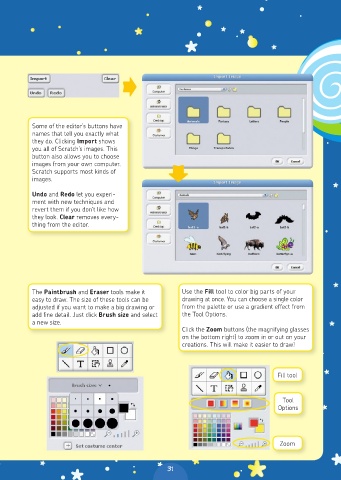
Some of the editor’s buttons have
          names that tell you exactly what
          they do. Clicking Import shows
          you all of Scratch’s images. This
          button also allows you to choose
          images from your own computer.
          Scratch supports most kinds of
          images.

          Undo and Redo let you experi-
          ment with new techniques and
          revert them if you don’t like how
          they look. Clear removes every-
          thing from the editor.


          The Paintbrush and Eraser tools make it    Use the Fill tool to color big parts of your
          easy to draw. The size of these tools can be   drawing at once. You can choose a single color
          adjusted if you want to make a big drawing or   from the palette or use a gradient effect from
          add fine detail. Just click Brush size and select   the Tool Options.
          a new size.
                                                     Click the Zoom buttons (the magnifying glasses
                                                     on the bottom right) to zoom in or out on your
                                                     creations. This will make it easier to draw!


                                                                                Fill tool


                                                                                  Tool
                                                                                Options


                                                                                 Zoom


                                                 31

