


Page 102 - Scratch Programming Playground
P. 102
4. Add the Walking Code to the Cat Sprite


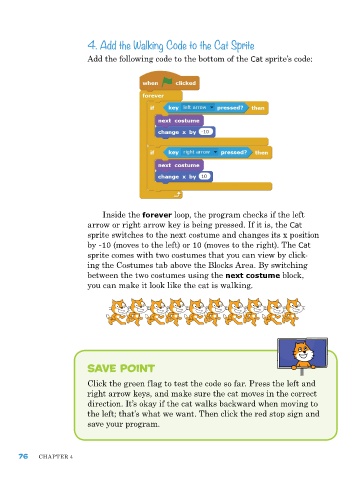
                         add the following code to the bottom of the Cat sprite’s code:


                             Inside the forever loop, the program checks if the left
                         arrow or right arrow key is being pressed. If it is, the Cat
                         sprite switches to the next costume and changes its x position
                         by -10 (moves to the left) or 10 (moves to the right). The Cat
                         sprite comes with two costumes that you can view by click-
                         ing the Costumes tab above the Blocks area. By switching
                         between the two costumes using the next costume block,
                         you can make it look like the cat is walking.


                         Save point

                         Click the green flag to test the code so far. press the left and
                         right arrow keys, and make sure the cat moves in the correct
                         direction. It’s okay if the cat walks backward when moving to
                         the left; that’s what we want. Then click the red stop sign and
                         save your program.


      76    ChapTer 4

