


Page 245 - Scratch Programming Playground
P. 245
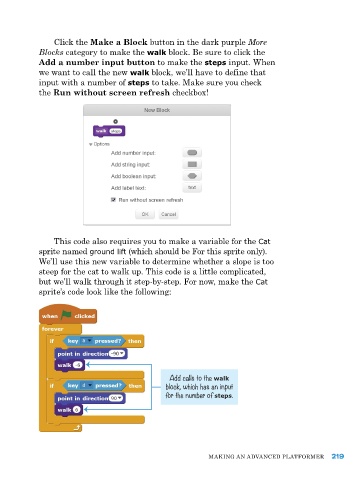
Click the Make a Block button in the dark purple More
            Blocks category to make the walk block. Be sure to click the
            Add a number input button to make the steps input. When
            we want to call the new walk block, we’ll have to define that
            input with a number of steps to take. Make sure you check
            the Run without screen refresh checkbox!


                this code also requires you to make a variable for the Cat
            sprite named ground lift (which should be for this sprite only).
            We’ll use this new variable to determine whether a slope is too
            steep for the cat to walk up. this code is a little complicated,
            but we’ll walk through it step-by-step. for now, make the Cat
            sprite’s code look like the following:


                                                Add calls to the walk
                                               block, which has an input
                                               for the number of steps.


                                                           MakING aN advaNCed pLatforMer     219

