


Page 249 - Scratch Programming Playground
P. 249
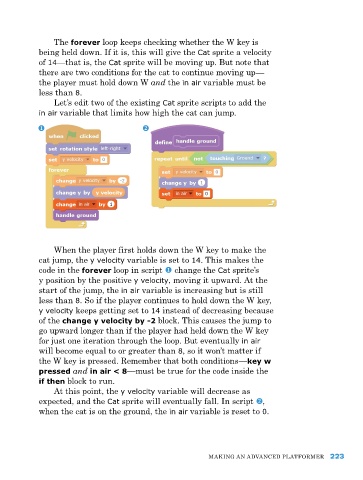
the forever loop keeps checking whether the W key is
being held down. If it is, this will give the Cat sprite a velocity
of 14—that is, the Cat sprite will be moving up. But note that
there are two conditions for the cat to continue moving up—
the player must hold down W and the in air variable must be
less than 8.
Let’s edit two of the existing Cat sprite scripts to add the
in air variable that limits how high the cat can jump.
When the player first holds down the W key to make the
cat jump, the y velocity variable is set to 14. this makes the
code in the forever loop in script change the Cat sprite’s
y position by the positive y velocity, moving it upward. at the
start of the jump, the in air variable is increasing but is still
less than 8. So if the player continues to hold down the W key,
y velocity keeps getting set to 14 instead of decreasing because
of the change y velocity by -2 block. this causes the jump to
go upward longer than if the player had held down the W key
for just one iteration through the loop. But eventually in air
will become equal to or greater than 8, so it won’t matter if
the W key is pressed. remember that both conditions—key w
pressed and in air < 8—must be true for the code inside the
if then block to run.
at this point, the y velocity variable will decrease as
expected, and the Cat sprite will eventually fall. In script ,
when the cat is on the ground, the in air variable is reset to 0.
MakING aN advaNCed pLatforMer 223

