


Page 35 - Scratch Programming Playground
P. 35
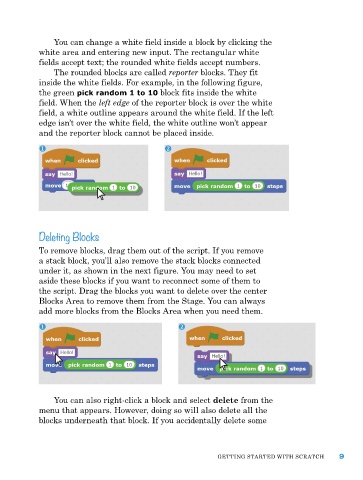
You can change a white field inside a block by clicking the
            white area and entering new input. the rectangular white
            fields accept text; the rounded white fields accept numbers.
                the rounded blocks are called reporter blocks. they fit
            inside the white fields. For example, in the following figure,
            the green pick random 1 to 10 block fits inside the white
            field. When the left edge of the reporter block is over the white
            field, a white outline appears around the white field. If the left
            edge isn’t over the white field, the white outline won’t appear
            and the reporter block cannot be placed inside.


            Deleting Blocks

            to remove blocks, drag them out of the script. If you remove
            a stack block, you’ll also remove the stack blocks connected
            under it, as shown in the next figure. You may need to set
            aside these blocks if you want to reconnect some of them to
            the script. drag the blocks you want to delete over the center
            Blocks area to remove them from the Stage. You can always
            add more blocks from the Blocks area when you need them.


                You can also right-click a block and select delete from the
            menu that appears. however, doing so will also delete all the
            blocks underneath that block. If you accidentally delete some


                                                             GettING Started WIth SCratCh      9

