


Page 36 - Scratch Programming Playground
P. 36
blocks, you can restore them by selecting Edit ► Undelete
                         from the menu bar.

                         Running Programs

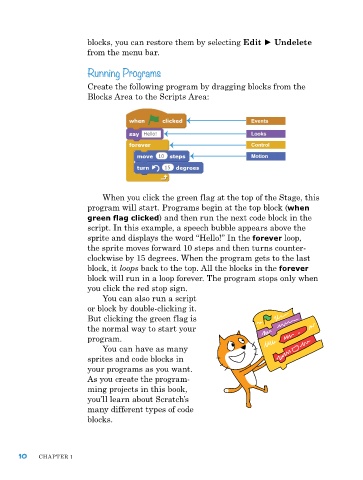
                         Create the following program by dragging blocks from the
                         Blocks area to the Scripts area:


                             When you click the green flag at the top of the Stage, this
                         program will start. programs begin at the top block (when
                         green flag clicked) and then run the next code block in the
                         script. In this example, a speech bubble appears above the
                         sprite and displays the word “hello!” In the forever loop,
                         the sprite moves forward 10 steps and then turns counter-
                         clockwise by 15 degrees. When the program gets to the last
                         block, it loops back to the top. all the blocks in the forever
                         block will run in a loop forever. the program stops only when
                         you click the red stop sign.
                             You can also run a script
                         or block by double-clicking it.
                         But clicking the green flag is
                         the normal way to start your
                         program.
                             You can have as many
                         sprites and code blocks in
                         your programs as you want.
                         as you create the program-
                         ming projects in this book,
                         you’ll learn about Scratch’s
                         many different types of code
                         blocks.


      10    Chapter 1

