


Page 34 - Scratch Programming Playground
P. 34
the list of sprite costumes is in the column to the left of
                         the drawing tools. If you want to save a costume as an image
                         file, right-click the costume and select Save to local file.


                         working with code Blocks


                         Before you begin programming, it’s good to get an idea of
                         how the code blocks snap together in the editor. throughout
                         this book, you’ll learn what each code block does.

                         Adding Blocks

                         to create a new code block, drag it from the center Blocks area
                         to the Scripts area. the code blocks that have a notch on top
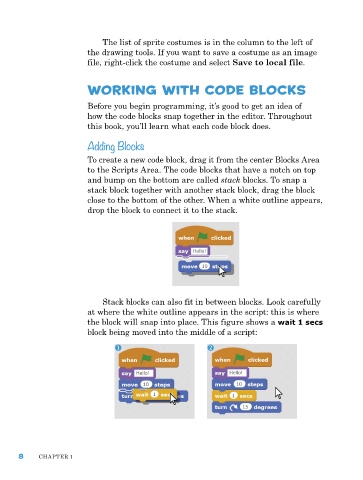
                         and bump on the bottom are called stack blocks. to snap a
                         stack block together with another stack block, drag the block
                         close to the bottom of the other. When a white outline appears,
                         drop the block to connect it to the stack.


                             Stack blocks can also fit in between blocks. Look carefully
                         at where the white outline appears in the script: this is where
                         the block will snap into place. this figure shows a wait 1 secs
                         block being moved into the middle of a script:


      8     Chapter 1

