


Page 43 - Scratch Programming Playground
P. 43
It’s also best to keep the project simple. If you start by
            making a complicated game like Minecraft or Zelda, you’ll
            quickly realize that it’s a lot of work. It’s more rewarding to
            finish a small project than to deal with the frustration of an
            unending, unfinished, and unplayable game.
                when you’ve completed your simple game, you can then
            build on top of it to make it more complex, which is the idea
            behind iterative development. First, you make the program
            work. Then, you make the program better. You can always add
            cool elements to the basic program after you finish it. or, if
            your program becomes too complicated, you can return to your
            sketches and figure out what you want to remove.
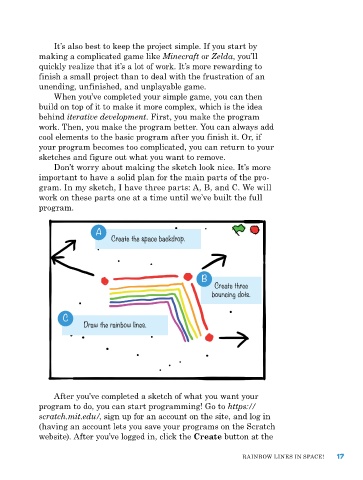
                Don’t worry about making the sketch look nice. It’s more
            important to have a solid plan for the main parts of the pro-
            gram. In my sketch, I have three parts: a, B, and C. we will
            work on these parts one at a time until we’ve built the full
            program.


                            A
                           A    Create the space backdrop.


                                                         B
                                                             Create three
                                                            bouncing dots.


                  C
                        Draw the rainbow lines.


                after you’ve completed a sketch of what you want your
            program to do, you can start programming! Go to https://

            scratch.mit.edu/, sign up for an account on the site, and log in
            (having an account lets you save your programs on the Scratch
            website). after you’ve logged in, click the Create button at the


                                                                    raInBow LIneS In SpaCe!    17

