


Page 96 - Scratch Programming Playground
P. 96
programming gravity requires variables. you can think
                         of a variable as a box for storing numbers or text that you can
                         use later in your program. we’ll create a variable that con-
                         tains a number representing how fast the cat is falling.
                              First, make sure the Cat sprite is selected in the Sprite
                         List and then click the Scripts tab. In the orange Data cate-
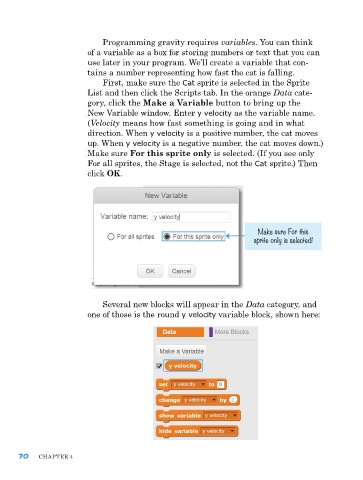
                         gory, click the Make a Variable button to bring up the
                         new variable window. enter y velocity as the variable name.
                         (Velocity means how fast something is going and in what
                         direction. when y velocity is a positive number, the cat moves
                         up. when y velocity is a negative number, the cat moves down.)
                         Make sure For this sprite only is selected. (If you see only
                         For all sprites, the Stage is selected, not the Cat sprite.) Then
                         click OK.


                                                                         Make sure For this
                                                                       sprite only is selected!


                             Several new blocks will appear in the Data category, and
                         one of those is the round y velocity variable block, shown here:


      70    ChapTer 4

