


Page 97 - Scratch Programming Playground
P. 97
Explore: For all sprites vs.
            For this sprite only


            when you create the y velocity variable, you have to select For
            this sprite only. This option creates a variable that only the
            Cat sprite can use. The For all sprites option will create a vari-
            able that all sprites can use.
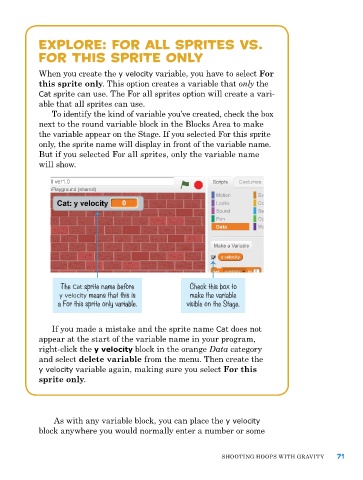
               To identify the kind of variable you’ve created, check the box
            next to the round variable block in the Blocks area to make
            the variable appear on the Stage. If you selected For this sprite
            only, the sprite name will display in front of the variable name.
            But if you selected For all sprites, only the variable name
            will show.


                  The Cat sprite name before          Check this box to
                 y velocity means that this is        make the variable
                 a For this sprite only variable.    visible on the Stage.


               If you made a mistake and the sprite name Cat does not
            appear at the start of the variable name in your program,
            right-click the y velocity block in the orange Data category
            and select delete variable from the menu. Then create the
            y velocity variable again, making sure you select For this
            sprite only.


                as with any variable block, you can place the y velocity
            block anywhere you would normally enter a number or some


                                                               ShooTIng hoopS wITh gravITy     71

