


Page 99 - Scratch Programming Playground
P. 99
when you click the green flag, the y velocity variable is set
            to 0, and then the script enters a forever loop. The y position
            (vertical position) of the Cat sprite is changed by y velocity, and
            y velocity is changed by -2. as the program goes through the
            loop, the y position will change faster and faster, making the
            cat fall faster and faster.


            Save point

            Before you click the green flag, drag the Cat sprite to the top
            of the Stage. when you click the green flag, notice that the cat
            begins to fall. If you want the cat to fall again, click the red
            stop sign, move the Cat sprite back to the top of the Stage, and
            click the green flag again. Save your program.


            2. Add the Ground Level Code

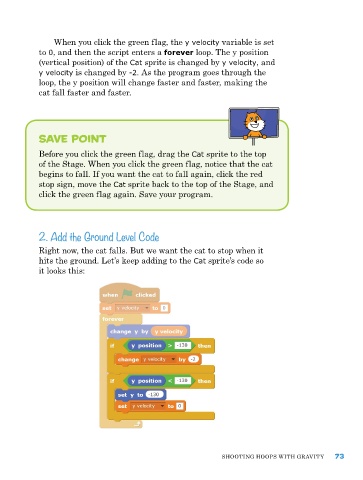
            right now, the cat falls. But we want the cat to stop when it
            hits the ground. Let’s keep adding to the Cat sprite’s code so
            it looks this:


                                                               ShooTIng hoopS wITh gravITy    73

