


Page 98 - Scratch Programming Playground
P. 98
text. The code block will use the number or text set in the
                         variable. when you use variables, your program can change
                         the variable’s number or text while the program is running.
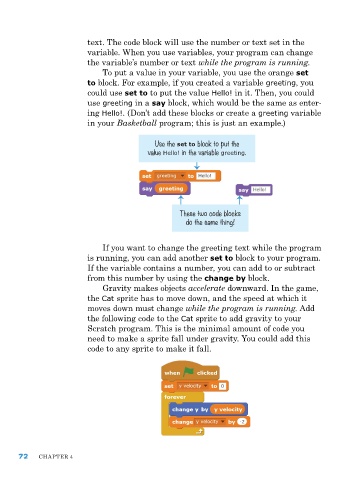
                             To put a value in your variable, you use the orange set
                         to block. For example, if you created a variable greeting, you
                         could use set to to put the value Hello! in it. Then, you could
                         use greeting in a say block, which would be the same as enter-
                         ing Hello!. (Don’t add these blocks or create a greeting variable
                         in your Basketball program; this is just an example.)

                                            Use the set to block to put the
                                          value Hello! in the variable greeting.


                                                   These two code blocks
                                                     do the same thing!


                             If you want to change the greeting text while the program
                         is running, you can add another set to block to your program.
                         If the variable contains a number, you can add to or subtract
                         from this number by using the change by block.
                             gravity makes objects accelerate downward. In the game,
                         the Cat sprite has to move down, and the speed at which it
                         moves down must change while the program is running. add
                         the following code to the Cat sprite to add gravity to your
                         Scratch program. This is the minimal amount of code you
                         need to make a sprite fall under gravity. you could add this
                         code to any sprite to make it fall.


      72    ChapTer 4

