


Page 193 - Basic Course
P. 193
KNX BASIC COURSE


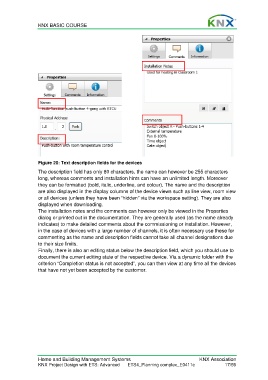
                  Figure 20: Text description fields for the devices

                  The description field has only 80 characters, the name can however be 255 characters
                  long, whereas comments and installation hints can have an unlimited length. Moreover
                  they can be formatted (bold, italic, underline, and colour). The name and the description
                  are also displayed in the display columns of the device views such as line view, room view
                  or all devices (unless they have been “hidden” via the workspace setting). They are also
                  displayed when downloading.
                  The installation notes and the comments can however only be viewed in the Properties
                  dialog or printed out in the documentation. They are generally used (as the name already
                  indicates) to make detailed comments about the commissioning or installation. However,
                  in the case of devices with a large number of channels, it is often necessary use these for
                  commenting as the name and description fields cannot take all channel designations due
                  to their size limits.
                  Finally, there is also an editing status below the description field, which you should use to
                  document the current editing state of the respective device. Via a dynamic folder with the
                  criterion “Completion status is not accepted”, you can then view at any time all the devices
                  that have not yet been accepted by the customer.


                  Home and Building Management Systems                                    KNX Association
                  KNX Project Design with ETS: Advanced   ETS4_Planning complex_E0411c               17/59

