


Page 206 - Basic Course
P. 206
KNX BASIC COURSE

                  selected the room name for all elements, it is now simple to create the correct text using
                  “Find and Replace” (as shown earlier).

                  8.2 Undo function

                  When you are working on a project, you often face the issue of restoring an intermediate
                  state, when wishing to do certain things in a different way.

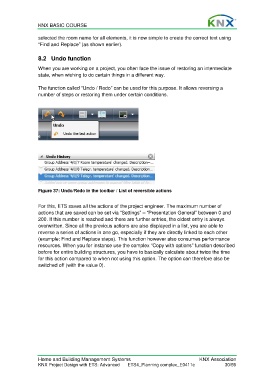
                  The function called “Undo / Redo” can be used for this purpose. It allows reversing a
                  number of steps or restoring them under certain conditions.


                  Figure 37: Undo/Redo in the toolbar / List of reversible actions

                  For this, ETS saves all the actions of the project engineer. The maximum number of
                  actions that are saved can be set via “Settings” – “Presentation General” between 0 and
                  200. If this number is reached and there are further entries, the oldest entry is always
                  overwritten. Since all the previous actions are also displayed in a list, you are able to
                  reverse a series of actions in one go, especially if they are directly linked to each other
                  (example: Find and Replace steps). This function however also consumes performance
                  resources. When you for instance use the complex “Copy with options” function described
                  before for entire building structures, you have to basically calculate about twice the time
                  for this action compared to when not using this option. The option can therefore also be
                  switched off (with the value 0).


                  Home and Building Management Systems                                    KNX Association
                  KNX Project Design with ETS: Advanced   ETS4_Planning complex_E0411c               30/59

