


Page 159 - Advanced Course
P. 159
KNX ADVANCED COURSE

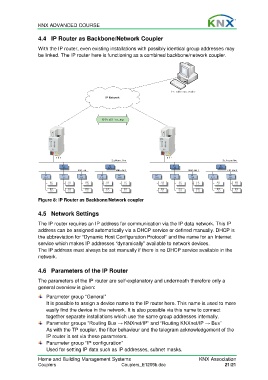
                  4.4  IP Router as Backbone/Network Coupler
                  With the IP router, even existing installations with possibly identical group addresses may
                  be linked. The IP router here is functioning as a combined backbone/network coupler.


                  Figure 8: IP Router as Backbone/Network coupler


                  4.5  Network Settings

                  The IP router requires an IP address for communication via the IP data network. This IP
                  address can be assigned automatically via a DHCP service or defined manually. DHCP is
                  the abbreviation for “Dynamic Host Configuration Protocol“ and the name for an Internet
                  service which makes IP addresses “dynamically” available to network devices.
                  The IP address must always be set manually if there is no DHCP service available in the
                  network.


                  4.6  Parameters of the IP Router

                  The parameters of the IP router are self-explanatory and underneath therefore only a
                  general overview is given:
                      Parameter group “General”
                      It is possible to assign a device name to the IP router here. This name is used to more
                      easily find the device in the network. It is also possible via this name to connect
                      together separate installations which use the same group addresses internally.
                      Parameter groups “Routing Bus → KNXnet/IP” and “Routing KNXnet/IP → Bus”
                      As with the TP coupler, the filter behaviour and the telegram acknowledgement of the
                      IP router is set via these parameters.
                      Parameter group “IP configuration”
                      Used for setting IP data such as IP addresses, subnet masks.
                  Home and Building Management Systems                                   KNX Association
                  Couplers                             Couplers_E1209b.doc                           21/21

