


Page 172 - Advanced Course
P. 172
KNX ADVANCED COURSE

                  the physically measured light level and the either parameterized or via object adjusted
                  setpoint.


                  4.6.2  Example
                  The sensor would – after the initial full application download – send a value of 200. But a
                  Luxmeter would see 500 Lux. The setpoint of the sensor is also 500 Lux. (It has to be –
                  otherwise the calibration would be faulty). So after the calibration trigger telegram has
                  been sent, the new measured value would be returned with “500”.

                  Only a connection between the controller and the actuator is now missing:

                      Automatic value control (Master value)


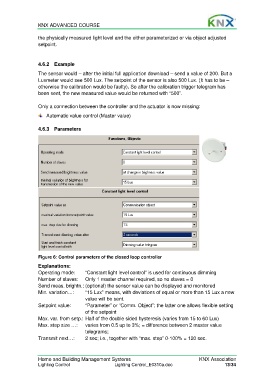
                  4.6.3  Parameters


                  Figure 6: Control parameters of the closed loop controller

                  Explanations:
                  Operating mode:      “Constant light level control” is used for continuous dimming
                  Number of slaves:    Only 1 master channel required, so no slaves = 0
                  Send meas. brightn.: (optional) the sensor value can be displayed and monitored
                  Min. variation…:     “15 Lux” means, with deviations of equal or more than 15 Lux a new
                                       value will be sent.
                  Setpoint value:      “Parameter” or “Comm. Object”; the latter one allows flexible setting
                                       of the setpoint
                  Max. var. from setp.: Half of the double sided hysteresis (varies from 15 to 60 Lux)
                  Max. step size …:    varies from 0.5 up to 3%; = difference between 2 master value
                                       telegrams;
                  Transmit next…:      2 sec; i.e., together with “max. step” 0-100% = 120 sec.


                  Home and Building Management Systems                                    KNX Association
                  Lighting Control                  Lighting Control_E0310a.doc                      13/34

