


Page 181 - Advanced Course
P. 181
KNX ADVANCED COURSE


                  5.5  Parameterisation Example


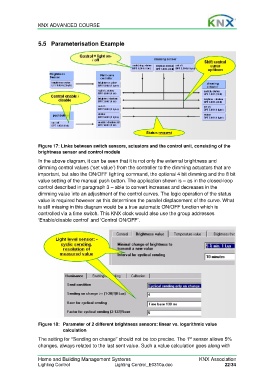
                  Figure 17: Links between switch sensors, actuators and the control unit, consisting of the
                  brightness sensor and control module

                  In the above diagram, it can be seen that it is not only the external brightness and
                  dimming control values (‘set value’) from the controller to the dimming actuators that are
                  important, but also the ON/OFF lighting command, the optional 4 bit dimming and the 8 bit
                  value setting of the manual push button. The application shown is – as in the closed-loop
                  control described in paragraph 3 – able to convert increases and decreases in the
                  dimming value into an adjustment of the control curves. The logic operation of the status
                  value is required however as this determines the parallel displacement of the curve. What
                  is still missing in this diagram would be a true automatic ON/OFF function which is
                  controlled via a time switch. This KNX clock would also use the group addresses
                  ‘Enable/disable control’ and ‘Control ON/OFF’.


                  Figure 18:   Parameter of 2 different brightness sensors: linear vs. logarithmic value
                             calculation

                  The setting for “Sending on change” should not be too precise. The 1  sensor allows 5%
                                                                                     st
                  changes, always related to the last sent value. Such a value calculation goes along with

                  Home and Building Management Systems                                    KNX Association
                  Lighting Control                  Lighting Control_E0310a.doc                      22/34

