


Page 73 - Advanced Course
P. 73
KNX ADVANCED COURSE

                  4.4  Regulation cf. § 2.1.3.1
                  The control of an air conditioner follows the philosophy that is applied for room
                  temperature regulation as already explained above (cf. §2.1.3.1). Consequently, it is also
                  possible to set the operating mode via an object (DPT 20.105). In order to establish the
                  regulation you will need, as seen previously, two components: a room temperature sensor
                  with a regulator and a valve. The valve is in this case the interface to the air conditioner.
                  You can both regulate and monitor the temperature with the room temperature regulator
                  via KNX. The room temperature regulator will in turn decide, based on a comparison
                  between the set and actual temperature, whether to heat or whether to cool. For example,
                  this would mean that if your target temperature is set to 19°C and the actual temperature
                  is 23°C, the valve opening of the air conditioner would be increased, while the valve
                  opening of the heating system (if applicable) would be decreased. The room temperature
                  regulator thus automatically regulates the conditioning in both directions. There is also the
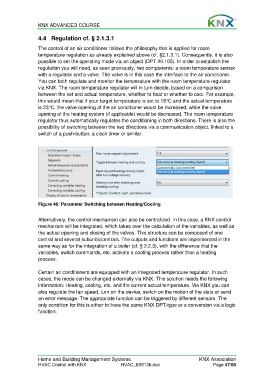
                  possibility of switching between the two directions via a communication object, linked to a
                  switch of a push-button, a clock timer or similar.


                  Figure 46: Parameter Switching between Heating/Cooling

                  Alternatively, the control mechanism can also be centralized. In this case, a KNX control
                  mechanism will be integrated, which takes over the calculation of the variables, as well as
                  the actual opening and closing of the valves. This structure can be composed of one
                  central and several subunits/centrals. The outputs and functions are implemented in the
                  same way as for the integration of a boiler (cf. § 2.2.3), with the difference that the
                  variables, switch commands, etc. activate a cooling process rather than a heating
                  process.

                  Certain air conditioners are equipped with an integrated temperature regulator. In such
                  cases, the mode can be changed externally via KNX. This solution needs the following
                  information: Heating, cooling, etc. and the current actual temperature. Via KNX you can
                  also regulate the fan speed, turn on the device, switch on the motion of the slats or send
                  an error message. The appropriate function can be triggered by different sensors. The
                  only condition for this is either to have the same KNX DPT-type or a conversion via a logic
                  function.


                  Home and Building Management Systems                                    KNX Association
                  HVAC Control with KNX                HVAC_E0813b.doc                          Page 47/60

