Page 58 - 100 - HR Management Manual
P. 58
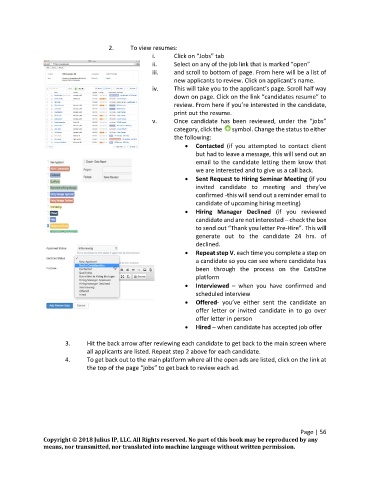
2.     To view resumes:
                                                   i.      Click on “Jobs” tab
                                                   ii.     Select on any of the job link that is marked “open”
                                                   iii.    and scroll to bottom of page. From here will be a list of
                                                           new applicants to review. Click on applicant’s name.
                                                   iv.     This will take you to the applicant’s page. Scroll half way
                                                           down on page. Click on the link “candidates resume” to
                                                           review. From here if you’re interested in the candidate,
                                                           print out the resume.
                                                   v.      Once  candidate  has  been  reviewed,  under  the  “jobs”
                                                           category, click the    symbol. Change the status to either
                                                           the following:
                                                                Contacted  (if  you  attempted  to  contact  client
                                                                  but had to leave a message, this will send out an
                                                                  email to the candidate letting them know that
                                                                  we are interested and to give us a call back.
                                                                Sent Request to Hiring Seminar Meeting (if you
                                                                  invited  candidate  to  meeting  and  they’ve
                                                                  confirmed -this will send out a reminder email to
                                                                  candidate of upcoming hiring meeting)
                                                                Hiring  Manager  Declined  (if  you  reviewed
                                                                  candidate and are not interested – check the box
                                                                  to send out “Thank you letter Pre-Hire”. This will
                                                                  generate  out  to  the  candidate  24  hrs.  of
                                                                  declined.
                                                                Repeat step V. each time you complete a step on
                                                                  a candidate so you can see where candidate has
                                                                  been  through  the  process  on  the  CatsOne
                                                                  platform
                                                                Interviewed  –  when  you  have  confirmed  and
                                                                  scheduled interview
                                                                Offered-  you’ve  either  sent  the  candidate  an
                                                                  offer  letter  or  invited  candidate  in  to  go  over
                                                                  offer letter in person
                                                                Hired – when candidate has accepted job offer

                       3.     Hit the back arrow after reviewing each candidate to get back to the main screen where
                              all applicants are listed. Repeat step 2 above for each candidate.
                       4.     To get back out to the main platform where all the open ads are listed, click on the link at
                              the top of the page “jobs” to get back to review each ad.


                                                                                                    Page | 56
               Copyright © 2018 Julius IP, LLC. All Rights reserved. No part of this book may be reproduced by any
               means, nor transmitted, nor translated into machine language without written permission.
   53   54   55   56   57   58   59   60   61   62   63