


Page 50 - Executive Director
P. 50
Leave the box open, click back into the document and find the next policy title in the
                              file, then repeat B&C just above to mark the entry.  Continue until all policy
                              titles are marked.

               Go  back  to  the  beginning  of  the  document  (press  Control+Home)  on  the
                       keyboard


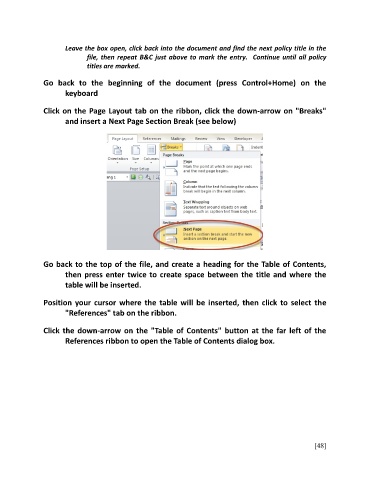
               Click on the Page Layout tab on the ribbon, click the down-arrow on "Breaks"
                       and insert a Next Page Section Break (see below)


               Go back to the top of the file, and create a heading for the Table of Contents,
                       then press enter twice to create space between the title and where the
                       table will be inserted.


               Position your cursor where the table will be inserted, then click to select the
                       "References" tab on the ribbon.

               Click the down-arrow on the "Table of Contents" button at the far left of the

                       References ribbon to open the Table of Contents dialog box.


                                                                                                         [48]

