


Page 68 - Receptionist
P. 68
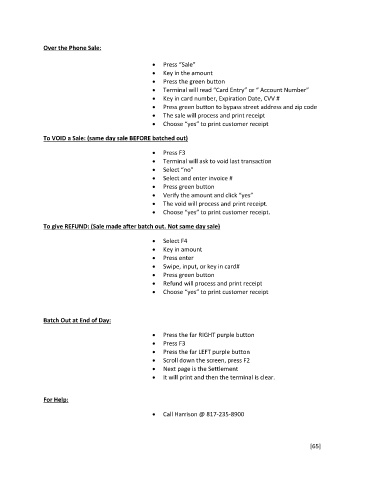
Over the Phone Sale:
Press “Sale”
Key in the amount
Press the green button
Terminal will read “Card Entry” or “ Account Number”
Key in card number, Expiration Date, CVV #
Press green button to bypass street address and zip code
The sale will process and print receipt
Choose “yes” to print customer receipt
To VOID a Sale: (same day sale BEFORE batched out)
Press F3
Terminal will ask to void last transaction
Select “no”
Select and enter invoice #
Press green button
Verify the amount and click “yes”
The void will process and print receipt.
Choose “yes” to print customer receipt.
To give REFUND: (Sale made after batch out. Not same day sale)
Select F4
Key in amount
Press enter
Swipe, input, or key in card#
Press green button
Refund will process and print receipt
Choose “yes” to print customer receipt
Batch Out at End of Day:
Press the far RIGHT purple button
Press F3
Press the far LEFT purple button
Scroll down the screen, press F2
Next page is the Settlement
It will print and then the terminal is clear.
For Help:
Call Harrison @ 817-235-8900
[65]

