


Page 88 - Receptionist
P. 88
19037 - eFAX


               Results Statement:                  To assure great communication with our clients, vendors,
                                                   referring vets, etc. by properly send and receiving faxes
                                                   electronically.

               How:
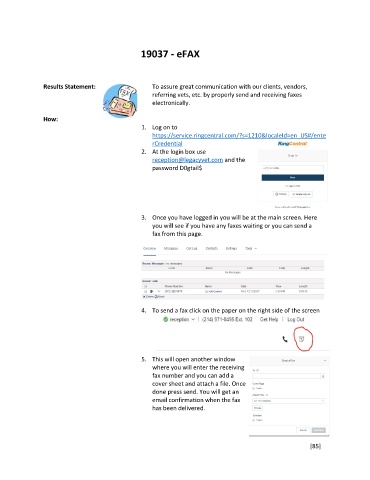
                                                1.  Log on to
                                                   https://service.ringcentral.com/?s=1210&localeId=en_US#/ente
                                                   rCredential
                                                2.  At the login box use
                                                   reception@legacyvet.com and the
                                                   password D0gtail$


                                                3.  Once you have logged in you will be at the main screen. Here
                                                   you will see if you have any faxes waiting or you can send a
                                                   fax from this page.


                                                4.  To send a fax click on the paper on the right side of the screen


                                                5.  This will open another window
                                                   where you will enter the receiving
                                                   fax number and you can add a
                                                   cover sheet and attach a file. Once
                                                   done press send. You will get an
                                                   email confirmation when the fax
                                                   has been delivered.


                                                                                                        [85]

