


Page 23 - Computing E-Book Grade 3
P. 23
The City School  2021-2022


           2.3.  Text Formatting in MS Word


           The quality of a document can be easily improved by changing its appearance.                             ext
           Most word processing programs allow users to apply various styles and formatting
           to text. Let’s now try out a few of these formatting methods in Microsoft Word.


           Changing the Font Typeface                                                                               Working with T


           The shape of text changes according to the font typeface. There are different font
           typefaces available for you to use in Microsoft Word. Different computers have

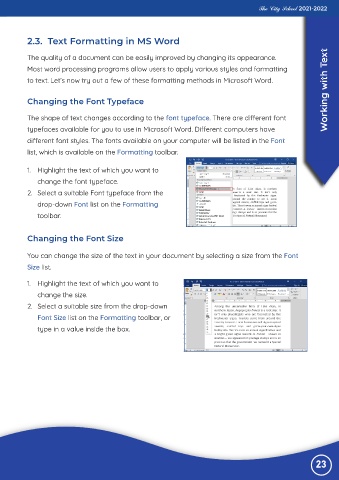
           different font styles. The fonts available on your computer will be listed in the Font
           list, which is available on the Formatting toolbar.


           1.  Highlight the text of which you want to

              change the font typeface.
           2.  Select a suitable Font typeface from the

              drop-down Font list on the Formatting
              toolbar.


           Changing the Font Size


           You can change the size of the text in your document by selecting a size from the Font
           Size list.


           1.  Highlight the text of which you want to

              change the size.
           2.  Select a suitable size from the drop-down
              Font Size list on the Formatting toolbar, or

              type in a value inside the box.


                                                                                                                23

