


Page 24 - Computing E-Book Grade 3
P. 24
The City School  2021-2022


           Font Styles


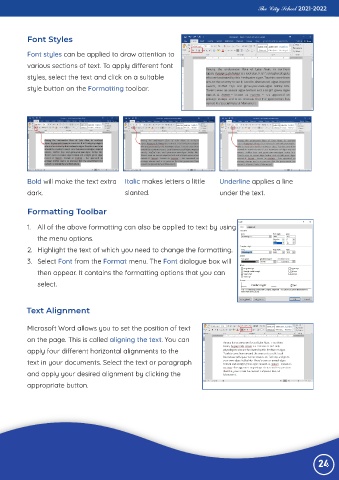
           Font styles can be applied to draw attention to
           various sections of text. To apply different font

           styles, select the text and click on a suitable
           style button on the Formatting toolbar.


           Bold will make the text extra  Italic makes letters a little       Underline applies a line

           dark.                             slanted.                         under the text.


           Formatting Toolbar


           1.  All of the above formatting can also be applied to text by using
              the menu options.

           2.  Highlight the text of which you need to change the formatting.
           3.  Select Font from the Format menu. The Font dialogue box will

              then appear. It contains the formatting options that you can
              select.


          Text Alignment


           Microsoft Word allows you to set the position of text
           on the page. This is called aligning the text. You can

           apply four different horizontal alignments to the
           text in your documents. Select the text or paragraph

           and apply your desired alignment by clicking the
           appropriate button.


                                                                                                                 24

