


Page 26 - Computing E-Book Grade 3
P. 26
The City School  2021-2022


           Indenting Paragraph Lines


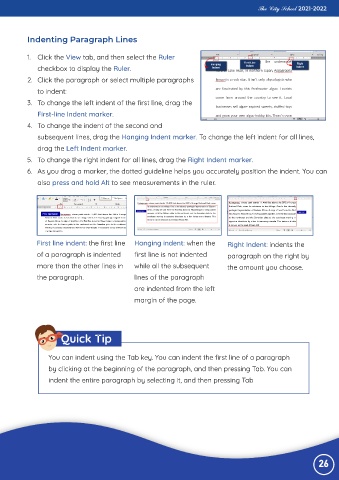
           1.  Click the View tab, and then select the Ruler

              checkbox to display the Ruler.
           2.  Click the paragraph or select multiple paragraphs

              to indent:
           3.  To change the left indent of the first line, drag the

              First-line Indent marker.
           4.  To change the indent of the second and

              subsequent lines, drag the Hanging Indent marker. To change the left indent for all lines,
              drag the Left Indent marker.

           5.  To change the right indent for all lines, drag the Right Indent marker.
           6.  As you drag a marker, the dotted guideline helps you accurately position the indent. You can

              also press and hold Alt to see measurements in the ruler.


              First line indent: the first line   Hanging indent: when the       Right Indent: indents the

              of a paragraph is indented        first line is not indented       paragraph on the right by
              more than the other lines in      while all the subsequent         the amount you choose.

              the paragraph.                    lines of the paragraph
                                                are indented from the left

                                                margin of the page.


                      Quick Tip


                  You can indent using the Tab key. You can indent the first line of a paragraph

                  by clicking at the beginning of the paragraph, and then pressing Tab. You can
                  indent the entire paragraph by selecting it, and then pressing Tab


                                                                                                                 26

