


Page 27 - Computing E-Book Grade 3
P. 27
The City School  2021-2022


           Indenting Paragraph


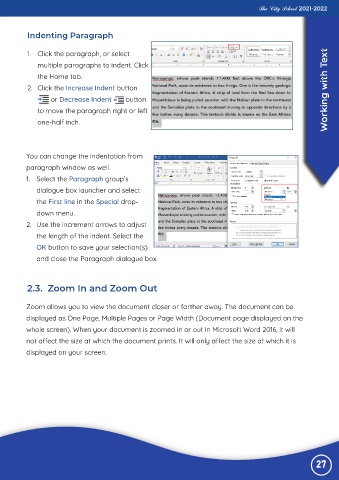
           1.  Click the paragraph, or select                                                                       ext
              multiple paragraphs to indent. Click

              the Home tab.
           2.  Click the Increase Indent button

                   or Decrease Indent        button                                                                 Working with T
              to move the paragraph right or left

              one-half inch.


          You can change the indentation from

          paragraph window as well.
          1.  Select the Paragraph group’s
              dialogue box launcher and select

              the First line in the Special drop-

              down menu.
          2.  Use the increment arrows to adjust
              the length of the indent. Select the

              OK button to save your selection(s)

              and close the Paragraph dialogue box.


           2.3.  Zoom In and Zoom Out


          Zoom allows you to view the document closer or farther away. The document can be
          displayed as One Page, Multiple Pages or Page Width (Document page displayed on the

          whole screen). When your document is zoomed in or out in Microsoft Word 2016, it will

          not affect the size at which the document prints. It will only affect the size at which it is
          displayed on your screen.


                                                                                                                27

