


Page 387 - Windows 10 May 2019 Update The Missing Manual: The Book That Should Have Been in the Box
P. 387
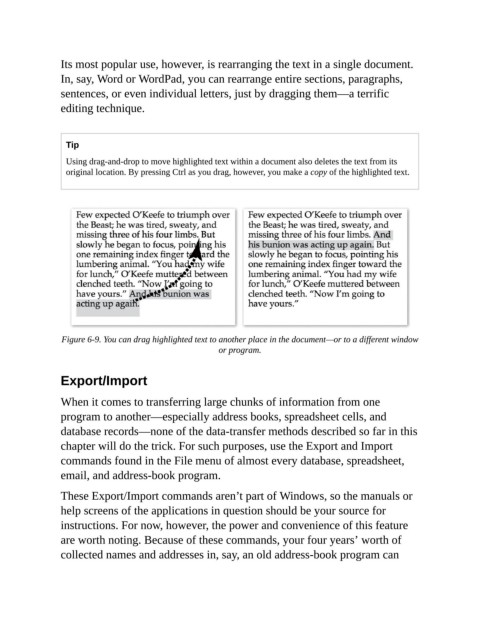
Its most popular use, however, is rearranging the text in a single document.

                In, say, Word or WordPad, you can rearrange entire sections, paragraphs,
                sentences, or even individual letters, just by dragging them—a terrific
                editing technique.


                  Tip

                  Using drag-and-drop to move highlighted text within a document also deletes the text from its
                  original location. By pressing Ctrl as you drag, however, you make a copy of the highlighted text.


                 Figure 6-9. You can drag highlighted text to another place in the document—or to a different window
                                                         or program.


                Export/Import

                When it comes to transferring large chunks of information from one
                program to another—especially address books, spreadsheet cells, and

                database records—none of the data-transfer methods described so far in this
                chapter will do the trick. For such purposes, use the Export and Import
                commands found in the File menu of almost every database, spreadsheet,

                email, and address-book program.

                These Export/Import commands aren’t part of Windows, so the manuals or
                help screens of the applications in question should be your source for

                instructions. For now, however, the power and convenience of this feature
                are worth noting. Because of these commands, your four years’ worth of
                collected names and addresses in, say, an old address-book program can

