


Page 392 - Windows 10 May 2019 Update The Missing Manual: The Book That Should Have Been in the Box
P. 392
Hooking Up an Unknown File Type


                Every now and then, you might try to open a mystery icon—one whose
                extension is missing, or whose extension Windows doesn’t recognize.
                Maybe you’ve been sent some weirdo document created by a beekeeper or

                a banjo transcriber using a program you don’t have. What will happen when
                you double-click that file?

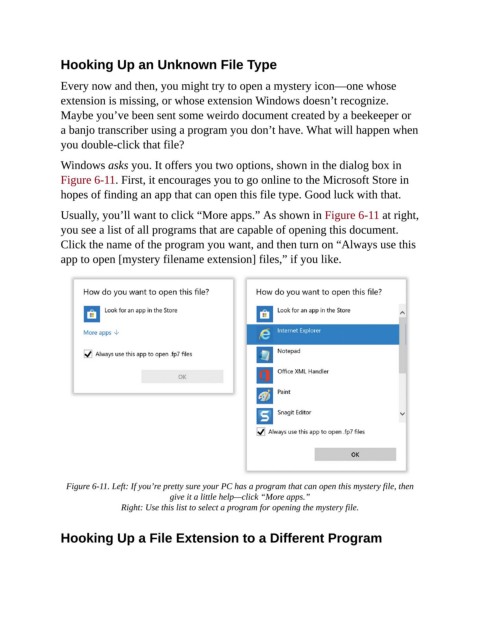
                Windows asks you. It offers you two options, shown in the dialog box in

                Figure 6-11. First, it encourages you to go online to the Microsoft Store in
                hopes of finding an app that can open this file type. Good luck with that.

                Usually, you’ll want to click “More apps.” As shown in Figure 6-11 at right,

                you see a list of all programs that are capable of opening this document.
                Click the name of the program you want, and then turn on “Always use this
                app to open [mystery filename extension] files,” if you like.


                  Figure 6-11. Left: If you’re pretty sure your PC has a program that can open this mystery file, then
                                            give it a little help—click “More apps.”

                                Right: Use this list to select a program for opening the mystery file.


                Hooking Up a File Extension to a Different Program

