


Page 636 - Windows 10 May 2019 Update The Missing Manual: The Book That Should Have Been in the Box
P. 636
Tip

                  Edge is perfectly happy to import the bookmarks you’ve carefully assembled in rival browsers. To
                  do that, open   →     → “Import or export” to begin. (You can even import them from several
                  browsers simultaneously.)


                The Favorites Bar


                The Favorites panel is one way to maintain a list of websites you visit
                frequently. But choosing a Favorite requires two clicks. Favorites toolbar
                lets you summon a few, very select, very favorite web pages with only one

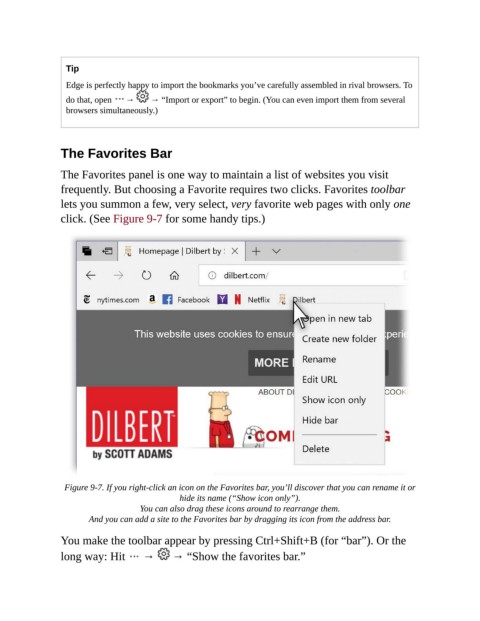
                click. (See Figure 9-7 for some handy tips.)


                 Figure 9-7. If you right-click an icon on the Favorites bar, you’ll discover that you can rename it or
                                               hide its name (“Show icon only”).

                                     You can also drag these icons around to rearrange them.

                        And you can add a site to the Favorites bar by dragging its icon from the address bar.
                You make the toolbar appear by pressing Ctrl+Shift+B (for “bar”). Or the

                long way: Hit   →            → “Show the favorites bar.”

