


Page 51 - 18-868 SEO PowerSuite Workflow_VPMGC
P. 51
SEO Workflow


               For any factors with an Info, Warning, or Error status, go to Details to explore the

               problem pages and see recommendations on how to get the issue fixed.


               Tip 1: See if your site is mobile-friendly. The Mobile-friendly factor shows
               whether or not the site’s homepage passes Google’s mobile friendliness test.

               Mind that failing that test can cost you losing positions in Mobile search — and
               that may mean a sharp decrease in traffic.


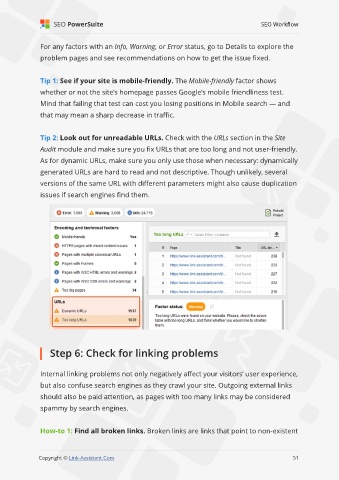
               Tip 2: Look out for unreadable URLs. Check with the URLs section in the Site

               Audit module and make sure you fix URLs that are too long and not user-friendly.
               As for dynamic URLs, make sure you only use those when necessary: dynamically

               generated URLs are hard to read and not descriptive. Though unlikely, several
               versions of the same URL with different parameters might also cause duplication

               issues if search engines find them.


                   Step 6: Check for linking problems


               Internal linking problems not only negatively affect your visitors’ user experience,
               but also confuse search engines as they crawl your site. Outgoing external links

               should also be paid attention, as pages with too many links may be considered
               spammy by search engines.


               How-to 1: Find all broken links. Broken links are links that point to non-existent


                                                                                                             51

               Copyright © Link-Assistant.Com                                                           51

