


Page 54 - 18-868 SEO PowerSuite Workflow_VPMGC
P. 54
SEO Workflow


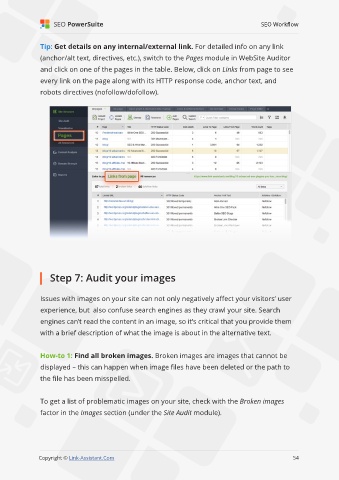
               Tip: Get details on any internal/external link. For detailed info on any link

               (anchor/alt text, directives, etc.), switch to the Pages module in WebSite Auditor
               and click on one of the pages in the table. Below, click on Links from page to see

               every link on the page along with its HTTP response code, anchor text, and
               robots directives (nofollow/dofollow).


                   Step 7: Audit your images


               Issues with images on your site can not only negatively affect your visitors’ user

               experience, but  also confuse search engines as they crawl your site. Search
               engines can’t read the content in an image, so it’s critical that you provide them

               with a brief description of what the image is about in the alternative text.


               How-to 1: Find all broken images. Broken images are images that cannot be
               displayed – this can happen when image files have been deleted or the path to

               the file has been misspelled.


               To get a list of problematic images on your site, check with the Broken images
               factor in the Images section (under the Site Audit module).


                                                                                                             54

               Copyright © Link-Assistant.Com                                                           54

