


Page 53 - Computing Book 4
P. 53
Spreadsheet Formatting                                                               Class 4


               Fitting and Scaling:

               On occasion, you may need to make small adjustments from the Print pane to fit your workbook
               content neatly onto a printed page. The Print pane includes several tools to help fit and scale your
               content, such as scaling and page margins.
               If some of your content is being cut off by the printer, you can use scaling to fit your workbook to
               the page automatically.

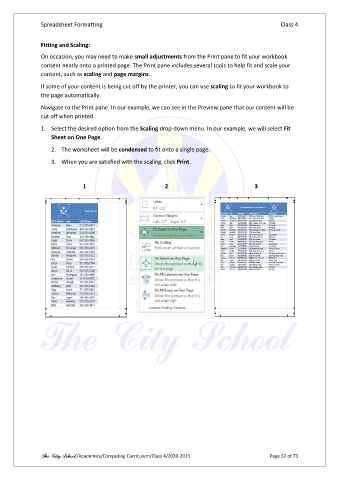
               Navigate to the Print pane. In our example, we can see in the Preview pane that our content will be
               cut off when printed.

               1.  Select the desired option from the Scaling drop-down menu. In our example, we will select Fit
                   Sheet on One Page.
                   2.  The worksheet will be condensed to fit onto a single page.

                   3.  When you are satisfied with the scaling, click Print.


                              1                            2                              3


               The City School /Academics/Computing Curriculum/Class 4/2020-2021                Page 52 of 73

