


Page 52 - Computing Book 4
P. 52
Spreadsheet Formatting                                                               Class 4


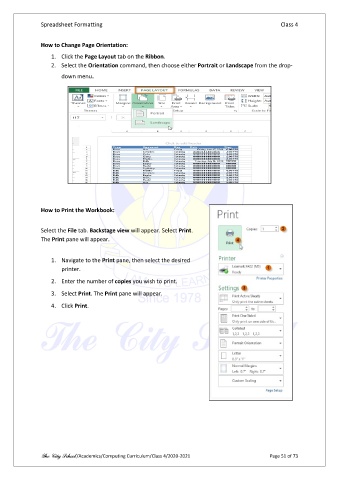
               How to Change Page Orientation:

                   1.  Click the Page Layout tab on the Ribbon.
                   2.  Select the Orientation command, then choose either Portrait or Landscape from the drop-
                       down menu.


               How to Print the Workbook:

               Select the File tab. Backstage view will appear. Select Print.
               The Print pane will appear.

                   1.  Navigate to the Print pane, then select the desired
                       printer.

                   2.  Enter the number of copies you wish to print.

                   3.  Select Print. The Print pane will appear.
                   4.  Click Print.


               The City School /Academics/Computing Curriculum/Class 4/2020-2021                Page 51 of 73

