


Page 49 - Computing Book 4
P. 49
Spreadsheet Formatting                                                               Class 4


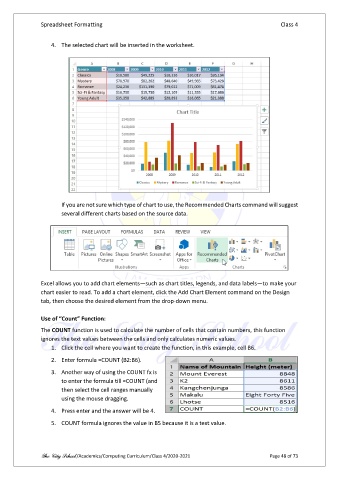
                   4.  The selected chart will be inserted in the worksheet.


                       If you are not sure which type of chart to use, the Recommended Charts command will suggest
                       several different charts based on the source data.


               Excel allows you to add chart elements—such as chart titles, legends, and data labels—to make your
               chart easier to read. To add a chart element, click the Add Chart Element command on the Design
               tab, then choose the desired element from the drop-down menu.

               Use of “Count” Function:

               The COUNT function is used to calculate the number of cells that contain numbers, this function
               ignores the text values between the cells and only calculates numeric values.
                   1.  Click the cell where you want to create the function, in this example, cell B6.
                   2.  Enter formula =COUNT (B2:B6).

                   3.  Another way of using the COUNT fx is
                       to enter the formula till =COUNT (and
                       then select the cell ranges manually
                       using the mouse dragging.

                   4.  Press enter and the answer will be 4.
                   5.  COUNT formula ignores the value in B5 because it is a text value.


               The City School /Academics/Computing Curriculum/Class 4/2020-2021                Page 48 of 73

