


Page 27 - Computing Book 5
P. 27
Working with Media                                                                   Class 5


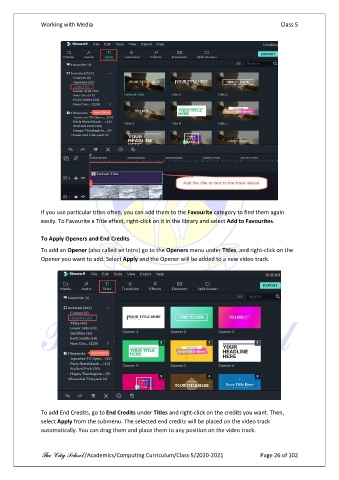
               If you use particular titles often, you can add them to the Favourite category to find them again
               easily. To Favourite a Title effect, right-click on it in the library and select Add to Favourites.

               To Apply Openers and End Credits
               To add an Opener (also called an Intro) go to the Openers menu under Titles, and right-click on the
               Opener you want to add. Select Apply and the Opener will be added to a new video track.


               To add End Credits, go to End Credits under Titles and right-click on the credits you want. Then,
               select Apply from the submenu. The selected end credits will be placed on the video track
               automatically. You can drag them and place them to any position on the video track.


               The City School /Academics/Computing Curriculum/Class 5/2020-2021            Page 26 of 102

