


Page 30 - Computing Book 5
P. 30
Working with Media                                                                   Class 5


               Save Customized Text Effects as Pre-sets

               Filmora9 allows you to save customized text effects as pre-sets for quick use in the future from both
               the Text Edit panel and the Advanced Text Edit panel.
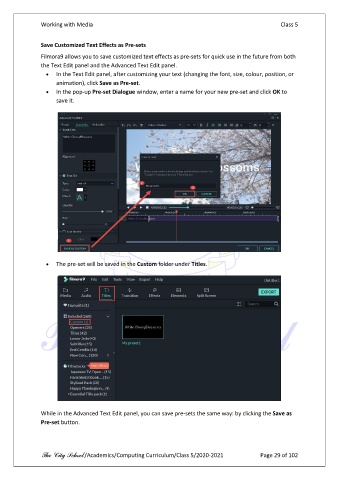
                 •  In the Text Edit panel, after customizing your text (changing the font, size, colour, position, or
                     animation), click Save as Pre-set.
                 •  In the pop-up Pre-set Dialogue window, enter a name for your new pre-set and click OK to
                     save it.


                 •  The pre-set will be saved in the Custom folder under Titles.


               While in the Advanced Text Edit panel, you can save pre-sets the same way: by clicking the Save as
               Pre-set button.


               The City School /Academics/Computing Curriculum/Class 5/2020-2021            Page 29 of 102

