


Page 51 - Computing Book 5
P. 51
Presenting Your Ideas                                                                Class 5


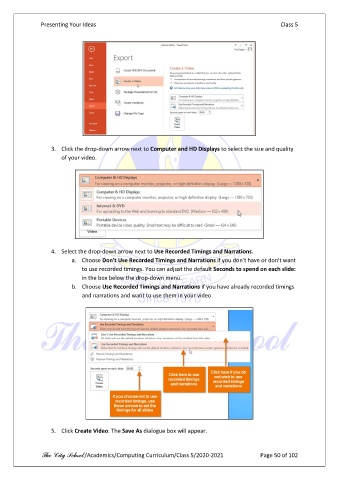
                   3.  Click the drop-down arrow next to Computer and HD Displays to select the size and quality
                       of your video.


                   4.  Select the drop-down arrow next to Use Recorded Timings and Narrations.
                          a.  Choose Don't Use Recorded Timings and Narrations if you don't have or don't want
                              to use recorded timings. You can adjust the default Seconds to spend on each slide:
                              in the box below the drop-down menu.
                          b.  Choose Use Recorded Timings and Narrations if you have already recorded timings
                              and narrations and want to use them in your video.


                   5.  Click Create Video. The Save As dialogue box will appear.


               The City School /Academics/Computing Curriculum/Class 5/2020-2021            Page 50 of 102

