


Page 46 - Computing Book 5
P. 46
Presenting Your Ideas                                                                Class 5


               Change the Chart Layout:

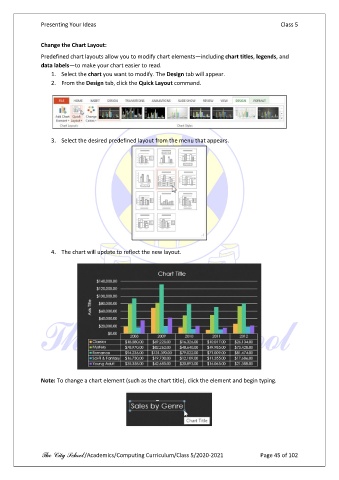
               Predefined chart layouts allow you to modify chart elements—including chart titles, legends, and
               data labels—to make your chart easier to read.
                   1.  Select the chart you want to modify. The Design tab will appear.
                   2.  From the Design tab, click the Quick Layout command.


                   3.  Select the desired predefined layout from the menu that appears.


                   4.  The chart will update to reflect the new layout.


               Note: To change a chart element (such as the chart title), click the element and begin typing.


               The City School /Academics/Computing Curriculum/Class 5/2020-2021            Page 45 of 102

