


Page 65 - TCS ICT Book 8
P. 65
The City School  2021-2022


                report, and you can choose from fields from more

                than one table or a query.
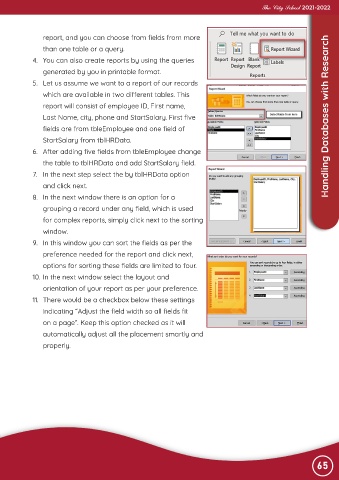
             4.  You can also create reports by using the queries
                generated by you in printable format.

             5.  Let us assume we want to a report of our records

                which are available in two different tables. This
                report will consist of employee ID, First name,
                Last Name, city, phone and StartSalary. First five                                 Advance Imaging  Handling Databases with Research

                fields are from tbleEmployee and one field of

                StartSalary from tblHRData.
             6.  After adding five fields from tbleEmployee change
                the table to tblHRData and add StartSalary field.

             7.  In the next step select the by tblHRData option

                and click next.
             8.  In the next window there is an option for a
                grouping a record under any field, which is used

                for complex reports, simply click next to the sorting

                window.
             9.  In this window you can sort the fields as per the
                preference needed for the report and click next,

                options for sorting these fields are limited to four.

             10. In the next window select the layout and
                orientation of your report as per your preference.
             11.  There would be a checkbox below these settings

                indicating “Adjust the field width so all fields fit

                on a page”. Keep this option checked as it will
                automatically adjust all the placement smartly and
                properly.


                                                                                                                65

