


Page 46 - TCS ICT Book 4
P. 46
The City School  2021-2022


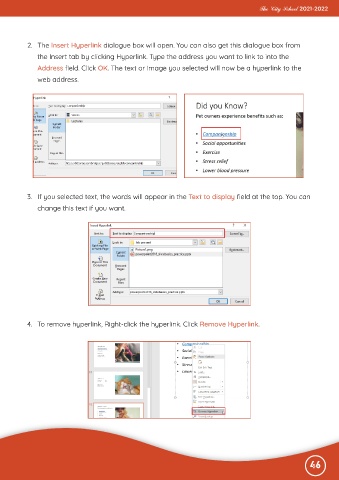
           2.  The Insert Hyperlink dialogue box will open. You can also get this dialogue box from
              the Insert tab by clicking Hyperlink. Type the address you want to link to into the

              Address field. Click OK. The text or image you selected will now be a hyperlink to the
              web address.


           3.  If you selected text, the words will appear in the Text to display field at the top. You can
              change this text if you want.


           4.  To remove hyperlink, Right-click the hyperlink. Click Remove Hyperlink.


                                                                                                              46

