


Page 118 - Learn To Program With Scratch
P. 118
Computer Memory
                                                                  ...
                                                      num       0.91428     1/5+5/7
                                                      den       0.2083      7/8–2/3
                                                                  ...
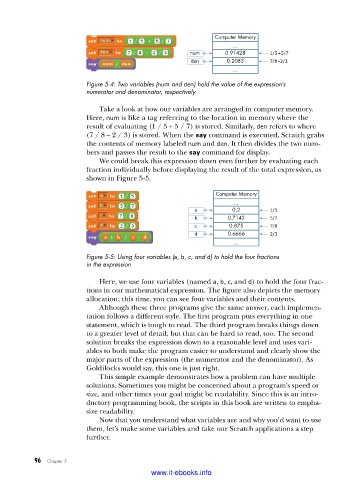
                         Figure 5-4: Two variables (num and den) hold the value of the expression’s
                         numerator and denominator, respectively .

                             Take a look at how our variables are arranged in computer memory.
                         Here, num is like a tag referring to the location in memory where the
                         result of evaluating (1 / 5 + 5 / 7) is stored. Similarly, den refers to where
                         (7 / 8 – 2 / 3) is stored. When the say command is executed, Scratch grabs
                         the contents of memory labeled num and den. It then divides the two num-
                         bers and passes the result to the say command for display.
                             We could break this expression down even further by evaluating each
                         fraction individually before displaying the result of the total expression, as
                         shown in Figure 5-5.

                                                             Computer Memory
                                                                  ...
                                                       a          0.2       1/5
                                                       b        0.7142      5/7
                                                       c         0.875      7/8
                                                       d        0.6666      2/3
                                                                  ...
                         Figure 5-5: Using four variables (a, b, c, and d) to hold the four fractions
                         in the expression

                             Here, we use four variables (named a, b, c, and d) to hold the four frac-
                         tions in our mathematical expression. The figure also depicts the memory
                         allocation; this time, you can see four variables and their contents.
                             Although these three programs give the same answer, each implemen-
                         tation follows a different style. The first program puts everything in one
                         statement, which is tough to read. The third program breaks things down
                         to a greater level of detail, but that can be hard to read, too. The second
                         solution breaks the expression down to a reasonable level and uses vari-
                         ables to both make the program easier to understand and clearly show the
                         major parts of the expression (the numerator and the denominator). As
                         Goldilocks would say, this one is just right.
                             This simple example demonstrates how a problem can have multiple
                         solutions. Sometimes you might be concerned about a program’s speed or
                         size, and other times your goal might be readability. Since this is an intro-
                         ductory programming book, the scripts in this book are written to empha-
                         size readability.
                             Now that you understand what variables are and why you’d want to use
                         them, let’s make some variables and take our Scratch applications a step
                         further.


           96   Chapter 5
                                           www.it-ebooks.info

