


Page 116 - Learn To Program With Scratch
P. 116
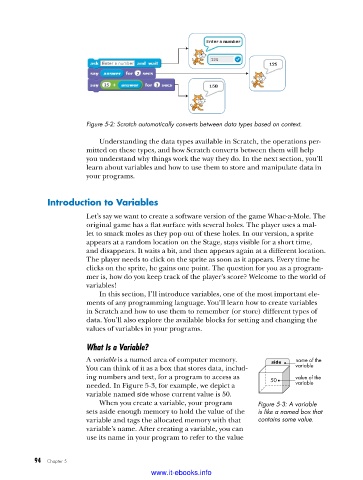
Figure 5-2: Scratch automatically converts between data types based on context .

                             Understanding the data types available in Scratch, the operations per-
                         mitted on these types, and how Scratch converts between them will help
                         you understand why things work the way they do. In the next section, you’ll
                         learn about variables and how to use them to store and manipulate data in
                         your programs.


              introduction to Variables

                         Let’s say we want to create a software version of the game Whac-a-Mole. The
                         original game has a flat surface with several holes. The player uses a mal-
                         let to smack moles as they pop out of these holes. In our version, a sprite
                         appears at a random location on the Stage, stays visible for a short time,
                         and disappears. It waits a bit, and then appears again at a different location.
                         The player needs to click on the sprite as soon as it appears. Every time he
                         clicks on the sprite, he gains one point. The question for you as a program-
                         mer is, how do you keep track of the player’s score? Welcome to the world of
                         variables!
                             In this section, I’ll introduce variables, one of the most important ele-
                         ments of any programming language. You’ll learn how to create variables
                         in Scratch and how to use them to remember (or store) different types of
                         data. You’ll also explore the available blocks for setting and changing the
                         values of variables in your programs.

                         What Is a Variable?

                         A variable is a named area of computer memory.     side   name of the
                         You can think of it as a box that stores data, includ-    variable
                         ing numbers and text, for a program to access as   50     value of the
                         needed. In Figure 5-3, for example, we depict a           variable
                           variable named side whose current value is 50.
                             When you create a variable, your program    Figure 5-3: A variable
                         sets aside enough memory to hold the value of the   is like a named box that
                         variable and tags the allocated memory with that   contains some value .
                         variable’s name. After creating a variable, you can
                         use its name in your program to refer to the value


           94   Chapter 5
                                           www.it-ebooks.info

