


Page 121 - Learn To Program With Scratch
P. 121
The first command sets rand1 to a random number between 1 and 6.
                          Think back to our box analogy: This command causes the sprite to find the
                          box labeled rand1 and put the generated random number inside it. The sec-
                          ond command assigns rand2 another random value between 1 and 6. Next,
                          the script broadcasts a message called Roll to the other two sprites (Die1 and
                          Die2) to notify them that they need to switch their costumes as specified
                          by rand1 and rand2. Once the Die1 and Die2 sprites have finished their job,
                          the script resumes and displays the sum of the numbers on the faces of the
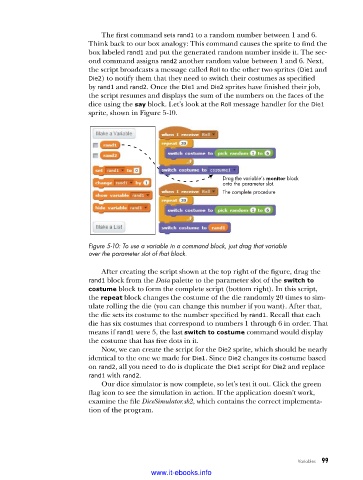
                          dice using the say block. Let’s look at the Roll message handler for the Die1
                          sprite, shown in Figure 5-10.


                                                               Drag the variable’s monitor block
                                                               onto the parameter slot.
                                                               The complete procedure


                          Figure 5-10: To use a variable in a command block, just drag that variable
                          over the parameter slot of that block .

                             After creating the script shown at the top right of the figure, drag the
                          rand1 block from the Data palette to the parameter slot of the switch to
                          costume block to form the complete script (bottom right). In this script,
                          the repeat block changes the costume of the die randomly 20 times to sim-
                          ulate rolling the die (you can change this number if you want). After that,
                          the die sets its costume to the number specified by rand1. Recall that each
                          die has six costumes that correspond to numbers 1 through 6 in order. That
                          means if rand1 were 5, the last switch to costume command would display
                          the costume that has five dots in it.
                             Now, we can create the script for the Die2 sprite, which should be nearly
                          identical to the one we made for Die1. Since Die2 changes its costume based
                          on rand2, all you need to do is duplicate the Die1 script for Die2 and replace
                          rand1 with rand2.
                             Our dice simulator is now complete, so let’s test it out. Click the green
                          flag icon to see the simulation in action. If the application doesn’t work,
                          examine the file DiceSimulator.sb2, which contains the correct implementa-
                          tion of the program.


                                                                                    Variables   99

                                           www.it-ebooks.info

