


Page 200 - Learn To Program With Scratch
P. 200
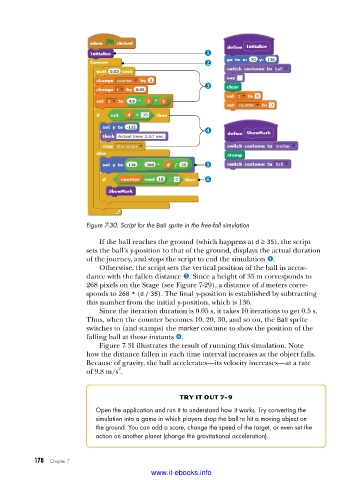
Figure 7-30: Script for the Ball sprite in the free-fall simulation
If the ball reaches the ground (which happens at d ≥ 35), the script
sets the ball’s y-position to that of the ground, displays the actual duration
of the journey, and stops the script to end the simulation x.
Otherwise, the script sets the vertical position of the ball in accor-
dance with the fallen distance y. Since a height of 35 m corresponds to
268 pixels on the Stage (see Figure 7-29), a distance of d meters corre-
sponds to 268 * (d / 35). The final y-position is established by subtracting
this number from the initial y-position, which is 136.
Since the iteration duration is 0.05 s, it takes 10 iterations to get 0.5 s.
Thus, when the counter becomes 10, 20, 30, and so on, the Ball sprite
switches to (and stamps) the marker costume to show the position of the
falling ball at those instants z.
Figure 7-31 illustrates the result of running this simulation. Note
how the distance fallen in each time interval increases as the object falls.
Because of gravity, the ball accelerates—its velocity increases—at a rate
2
of 9.8 m/s .
try it out 7-9
Open the application and run it to understand how it works . Try converting the
simulation into a game in which players drop the ball to hit a moving object on
the ground . You can add a score, change the speed of the target, or even set the
action on another planet (change the gravitational acceleration) .
178 Chapter 7
www.it-ebooks.info

