


Page 203 - Learn To Program With Scratch
P. 203
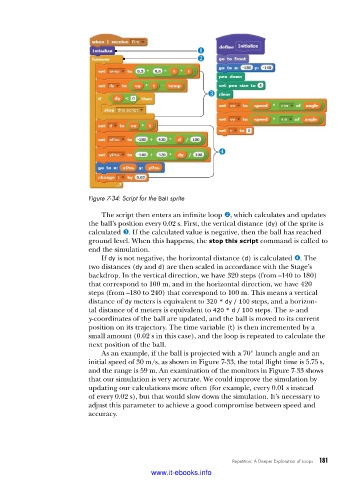
Figure 7-34: Script for the Ball sprite
The script then enters an infinite loop v, which calculates and updates
the ball’s position every 0.02 s. First, the vertical distance (dy) of the sprite is
calculated w. If the calculated value is negative, then the ball has reached
ground level. When this happens, the stop this script command is called to
end the simulation.
If dy is not negative, the horizontal distance (d) is calculated x. The
two distances (dy and d) are then scaled in accordance with the Stage’s
backdrop. In the vertical direction, we have 320 steps (from –140 to 180)
that correspond to 100 m, and in the horizontal direction, we have 420
steps (from –180 to 240) that correspond to 100 m. This means a vertical
distance of dy meters is equivalent to 320 * dy / 100 steps, and a horizon-
tal distance of d meters is equivalent to 420 * d / 100 steps. The x- and
y- coordinates of the ball are updated, and the ball is moved to its current
position on its trajectory. The time variable (t) is then incremented by a
small amount (0.02 s in this case), and the loop is repeated to calculate the
next position of the ball.
As an example, if the ball is projected with a 70° launch angle and an
initial speed of 30 m/s, as shown in Figure 7-33, the total flight time is 5.75 s,
and the range is 59 m. An examination of the monitors in Fig ure 7-33 shows
that our simulation is very accurate. We could improve the simulation by
updating our calculations more often (for example, every 0.01 s instead
of every 0.02 s), but that would slow down the simulation. It’s necessary to
adjust this parameter to achieve a good compromise between speed and
accuracy.
Repetition: A Deeper Exploration of Loops 181
www.it-ebooks.info

