


Page 44 - Learn To Program With Scratch
P. 44
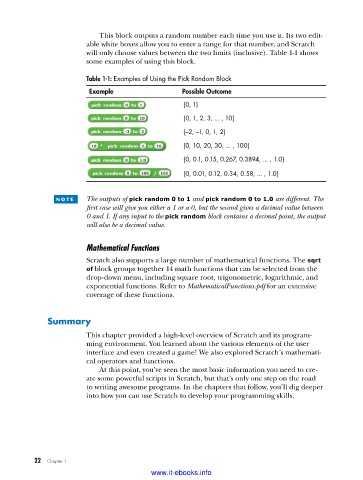
This block outputs a random number each time you use it. Its two edit-
                         able white boxes allow you to enter a range for that number, and Scratch
                         will only choose values between the two limits (inclusive). Table 1-1 shows
                         some examples of using this block.

                         Table 1-1: Examples of Using the Pick Random Block
                          Example                   Possible Outcome
                                                    {0, 1}

                                                    {0, 1, 2, 3,  . . . , 10}
                                                    {–2, –1, 0, 1, 2}
                                                    {0, 10, 20, 30,  . . . , 100}

                                                    {0, 0 .1, 0 .15, 0 .267, 0 .3894,  . . . , 1 .0}
                                                    {0, 0 .01, 0 .12, 0 .34, 0 .58,  . . . , 1 .0}


                 n o t e    The outputs of pick random 0 to 1 and pick random 0 to 1.0 are different. The
                         first case will give you either a 1 or a 0, but the second gives a decimal value between
                         0 and 1. If any input to the pick random block contains a decimal point, the output
                         will also be a decimal value.


                         Mathematical Functions
                         Scratch also supports a large number of mathematical functions. The sqrt
                         of block groups together 14 math functions that can be selected from the
                         drop-down menu, including square root, trigonometric, logarithmic, and
                         exponential functions. Refer to MathematicalFunctions.pdf for an extensive
                         coverage of these functions.


              Summary
                         This chapter provided a high-level overview of Scratch and its program-
                         ming environment. You learned about the various elements of the user
                         interface and even created a game! We also explored Scratch’s mathemati-
                         cal operators and functions.
                             At this point, you’ve seen the most basic information you need to cre-
                         ate some powerful scripts in Scratch, but that’s only one step on the road
                         to writing awesome programs. In the chapters that follow, you’ll dig deeper
                         into how you can use Scratch to develop your programming skills.


           22   Chapter 1
                                           www.it-ebooks.info

